Making Enterprise AI Work
A playbook for moving from AI Projects to an AI Platform.


Executive Summary
The enterprise AI market has matured into a genuinely multi-model landscape. Different surveys tell different stories about market leadership, with some showing Anthropic’s Claude leading enterprise deployments while others report OpenAI maintaining overall share across broader buyer segments (1)(2). The important insight for buyers is simple: treat models as interchangeable parts and design for routing, not vendor dependence.
Recent benchmark shifts matter less than their business implications. Claude 4.5 Sonnet currently leads on coding benchmarks and offers extended autonomous operation for complex, multi-step tasks (3). GPT-5 brings strong general-purpose performance with clear pricing that encourages thoughtful resource allocation (4). The technical details matter far less than understanding which tool fits which task.
Regulation has hardened across jurisdictions. The EU’s general-purpose AI obligations are now in effect, with specific requirements for high-capability models. The UK launched a supervised sandbox for ambitious implementations. China requires labeling for synthetic content (6)(7)(8)(9). These are practical constraints that affect vendor selection and data handling, not abstract legal concerns.
The approach presented here prioritizes immediate value creation through an activation-first methodology while building toward long-term strategic capabilities. Rather than focusing on technical details or algorithmic foundations, this guide emphasizes practical implementation, strategic thinking, and the development of judgment about when and how to apply AI technologies effectively.
The execution challenge: Recent research shows that while AI saves roughly 5.7 hours per employee per week, the strategic concept that time saved must convert to high-value work remains verified, though specific conversion figures lack independent verification. More striking: research focused on open-source developers found that AI assistance actually made them 19 percent slower overall, attributing the time loss to the significant cognitive overhead required for checking and debugging subtly incorrect AI-generated code (16). Time saved only creates value when processes are redesigned to absorb it. This guide provides the framework for getting that redesign right.
Understanding the AI Landscape
The Evolution of Enterprise AI
The journey toward modern AI implementation in businesses has unfolded through several distinct phases, each building upon the previous to create today’s capabilities.
The foundation began with the big data revolution (2010–2012). Organizations started collecting massive volumes of data, gradually recognizing the potential value within these datasets. This recognition created the imperative for more sophisticated analytical approaches and laid the groundwork for machine learning applications.
Machine learning emerged as the natural evolution (2005–2010), introducing algorithms capable of finding patterns without explicit programming. Early applications such as spam filters and recommendation engines demonstrated the power of data-driven decision making. These successes built organizational confidence in automated systems and created appetite for more sophisticated applications.
Deep learning brought neural networks to the forefront of business applications (2012–2015), enabling unprecedented accuracy in pattern recognition and prediction. Tasks that previously required human judgment, such as image recognition and natural language processing, became amenable to automation. This capability expansion fundamentally changed the scope of what businesses could automate and augment.
Generative AI represents the current frontier (2022-present) and a paradigm shift in how businesses think about AI applications. Unlike previous technologies that primarily analyzed existing data, generative AI creates new content by learning patterns from training data. This capability enables applications ranging from content creation to code generation, opening entirely new categories of business value.
Large Language Models serve as the most accessible and immediately applicable form of generative AI for most businesses. Focused specifically on understanding and generating text, LLMs have democratized access to AI capabilities through natural language interfaces that make them accessible to non-technical users.
Understanding Large Language Models
Large Language Models are AI systems trained on massive datasets encompassing text, images, videos, and code. This training enables them to excel at multiple tasks including summarization, translation, creative work, and code generation. Conceptually, they function as highly capable assistants that process and generate information based on learned patterns from their training data.
The technical foundation rests on transformer architectures that enable understanding of context and relationships between words. During training, these models identify statistical patterns and relationships within vast corpora of text, developing an implicit understanding of language structure, factual relationships, and reasoning patterns.
When deployed, LLMs operate through a prediction mechanism. Given an input prompt, they predict the most likely next output based on their training. This seemingly simple mechanism enables sophisticated behaviors including coherent long-form text generation, contextual understanding across lengthy documents, and apparent reasoning capabilities. However, it’s crucial to understand that this is fundamentally pattern matching and generation, not true understanding in the human sense.
Today’s Reality
The Multi-Model Market
Enterprise AI adoption has reached an inflection point where no single vendor dominates across all use cases. Menlo Ventures reports Anthropic leading enterprise deployments at 32 percent, with OpenAI at 25 percent and Google at 20 percent (1). However, separate surveys from Andreessen Horowitz show OpenAI maintaining overall market-share leadership when measured across broader buyer populations and different adoption patterns (2).
This apparent contradiction reveals an important truth: the market has diversified by use case. Organizations choose Claude for coding and agent workflows, GPT for general-purpose applications and ecosystem integration, and Gemini for extremely long documents and Google Workspace integration. The three proprietary providers collectively hold approximately 87 percent market share, with the remaining 13 percent split among open-source alternatives (2).
The decisive shift is architectural, not competitive. Sophisticated buyers now assume multi-model deployments by default. Over a third of enterprises report using five or more models in parallel, routing work to the most appropriate tool rather than standardizing on a single vendor (15)(2).
What Changed Recently
Coding leadership shifted. Claude 4.5 Sonnet posted strong results on software engineering benchmarks and emphasized “computer use” capabilities, allowing the model to operate autonomously on complex tasks for extended periods (3). For enterprises building agent workflows that must maintain state across hours rather than minutes, this matters more than raw benchmark numbers.
Reasoning capabilities expanded. Google introduced Deep Think within Gemini 2.5 Pro, extending thinking time for complex reasoning tasks while maintaining the model’s industry-leading context windows of 1–2 million tokens (17). This positions Gemini competitively for problems requiring both extensive context and deep analytical reasoning.
Pricing became strategic. GPT-5 introduced clear API pricing that encourages deliberate resource allocation, particularly around expensive “thinking” tokens for complex reasoning tasks (4). ChatGPT’s context window of roughly 256K tokens covers most real enterprise documents without architectural gymnastics (5).
Regulation hardened. The EU’s framework for general-purpose AI is now operational, with a computational threshold that triggers systemic-risk obligations and mandates incident reporting on tight timelines (6)(7). The UK’s AI Growth Lab provides a supervised sandbox for ambitious implementations (8). China requires labeling for all synthetic content (9). These requirements affect vendor selection, data handling, and incident monitoring procedures.
The Open-Source Reality
Llama 4 disappointed in enterprise settings. Despite Meta’s aggressive marketing and 650 million reported downloads, enterprise surveys consistently note that Llama 4 “underwhelmed in real-world settings” (10). Open-source market share declined from 19 percent to 13 percent in recent months, with the performance gap between marketing claims and production results contributing to buyer skepticism (2). Organizations evaluating Llama should note that it operates under Meta’s proprietary license, not Apache 2.0, with specific restrictions including EU download prohibitions for some multimodal variants (10).
DeepSeek offers genuine cost disruption. The Chinese model achieved comparable performance to Western premium offerings at dramatically lower unit economics, with training costs on the order of $6 million versus $100 million-plus for comparable Western models (14). For organizations where cost is decisive and compliance permits, this represents a legitimate alternative.
Mistral strengthened enterprise positioning. Significant 2025 funding and partnerships expanded Mistral’s enterprise footprint, particularly in Europe. Organizations requiring Model Context Protocol support and first-party connectors should include Mistral in vendor evaluations (18).
Beyond the Hype: What Most Get Wrong About AI
The Real History of AI
Most people believe AI began with ChatGPT’s launch in 2022, but artificial intelligence actually originated in the 1940s. Even concepts like agents and multi-agent systems that seem cutting-edge today have decades of history. The key difference isn’t the concepts themselves but their accessibility. Previously, AI was primarily the domain of businesses, industries, governments, defense, and space agencies. What changed wasn’t AI’s existence but its democratization to individuals.
This historical blindness creates dangerous misconceptions. Organizations rush to implement “new” AI concepts without learning from decades of enterprise experience. They reinvent wheels that have been thoroughly tested, missing opportunities to build on established best practices and avoid well-documented pitfalls.
Beyond the Data Myth
The popular narrative insists that all AI requires massive datasets, but this fundamentally misunderstands the technology landscape. Symbolic AI, which operates on logical rules and relationships rather than statistical patterns, powers some of the most impressive achievements in artificial intelligence. Google’s AlphaFold, which revolutionized protein structure prediction, combines neural networks with symbolic reasoning about physical and chemical constraints.
This misconception leads organizations to delay AI adoption, believing they need vast data lakes before beginning. In reality, many valuable AI applications work with modest, well-structured datasets or even purely symbolic representations of business rules and relationships.
The Complexity Paradox
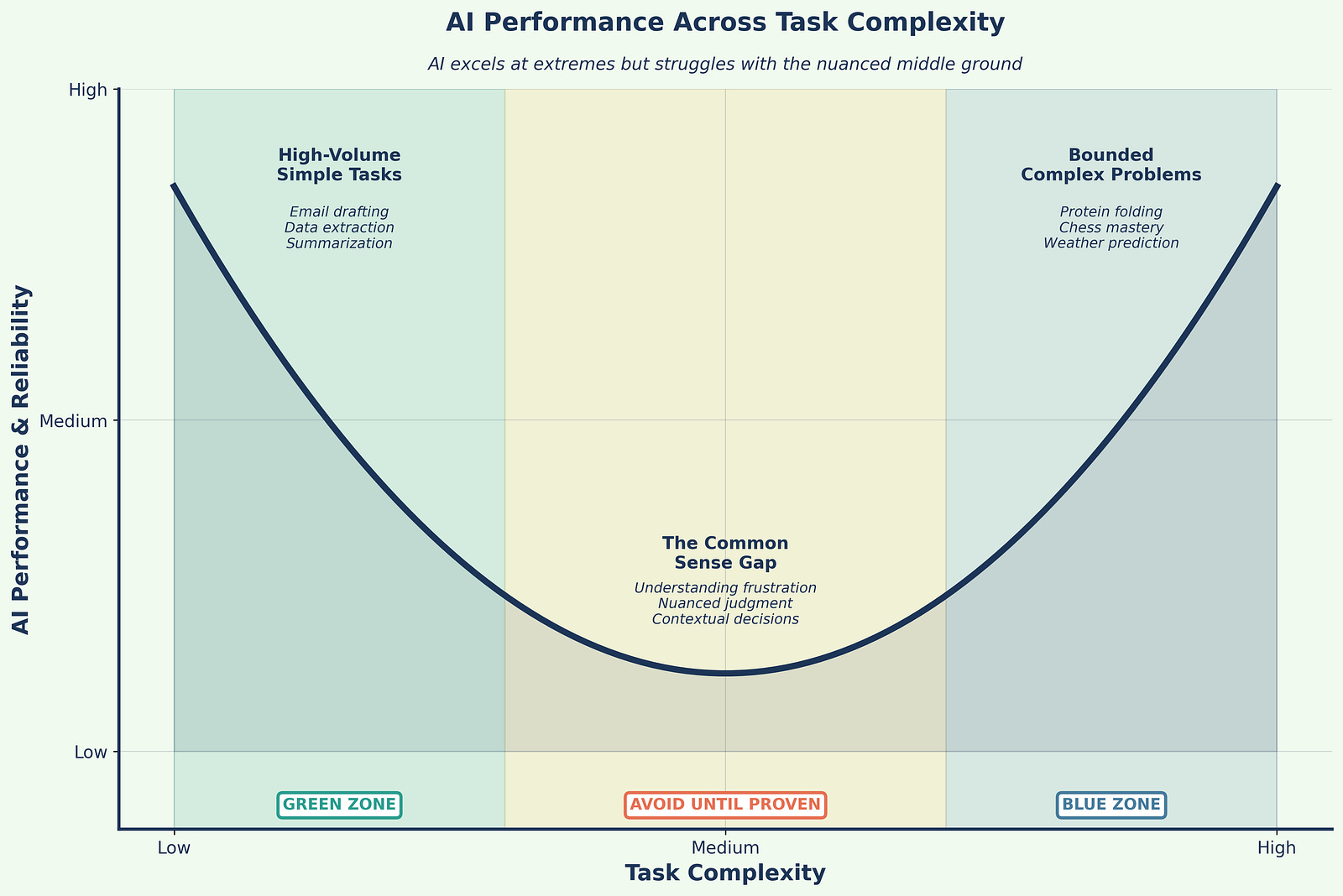
AI exhibits a peculiar performance pattern that defies intuition: it excels at both extremes of complexity but struggles with the middle ground (Figure 1). At one extreme, AI handles simple, high-volume tasks brilliantly: polishing emails, summarizing documents, extracting data from forms. At the other extreme, it achieves superhuman performance on bounded, complex challenges like protein folding, chess mastery, or weather prediction.
However, AI often fails at tasks that fall between these extremes, tasks requiring common sense, contextual judgment, or nuanced understanding. A system that can predict protein structures might fail to understand why a customer is frustrated. This paradox means organizations must carefully select use cases, avoiding the tempting middle ground where AI appears capable but delivers disappointing results.
Design your portfolio like a barbell: Fund simple automations and a few frontier agents. Avoid the mushy middle until you can prove it works in your specific context.
The Decision-Making Delusion
Perhaps the most dangerous misconception is that AI will take over decision-making. This fundamentally misunderstands both AI capabilities and the nature of decisions. While AI excels at pattern matching, identifying what has happened before, true decision-making requires navigating uncertainty, noise, and novel situations.
Human decision-making integrates data, information, and knowledge with intuition and judgment. We make leaps beyond available evidence, trust gut feelings, and adapt to entirely new contexts. AI can support these decisions by providing better pattern recognition and data synthesis, but it cannot replace the human capacity to decide under uncertainty. Organizations that understand this use AI to enhance human decision-making rather than replace it.
The Thinking Machine Fallacy
Some believe AI actually thinks, but this anthropomorphization misleads strategic planning. LLMs process patterns and generate statistically likely responses; they don’t understand, contemplate, or reason in any human sense. When we say an AI “knows” something, we mean it can reproduce patterns from its training data. When it “reasons,” it follows statistical correlations between concepts.
This distinction matters enormously for implementation. Organizations that treat AI as a thinking partner set themselves up for failure. Those that understand AI as a sophisticated pattern-matching and generation tool can deploy it effectively within appropriate boundaries.
Strategic Framework for AI Implementation
The Activation-First Approach
Traditional approaches to data and AI strategy often begin with extensive planning phases, focusing on long-term vision and comprehensive governance frameworks. While these elements remain important, the activation-first approach prioritizes immediate value creation while building toward strategic goals.
This methodology poses four fundamental questions that drive implementation priorities:
What can LLMs do now with existing data? This question focuses attention on immediate opportunities rather than perfect future states. By identifying quick wins, organizations can demonstrate value while learning what works in their specific context. Start with one workflow with measurable pain. Keep the first integration read-only if possible.
How do quick wins fit broader strategic goals? This ensures that tactical implementations contribute to strategic objectives rather than creating isolated successes that don’t scale or integrate. Do not create isolated pockets of automation.
What governance rules are needed for specific use cases? This targeted approach to governance avoids over-engineering while ensuring appropriate controls for each application’s risk profile. Decide early where human review is mandatory.
How can processes be managed and scaled? This practical focus on operations ensures that successful pilots can grow into enterprise-wide capabilities without requiring complete redesigns. Instrument cost per resolved unit, tool-call success, escalation rates, latency under concurrency, and abstention. Re-benchmark quarterly.
Implementation Timeline Realities
Organizations should set realistic expectations for AI value realization. Research shows that most companies can move from pilot to production when they treat the work like an IT product with clear SLOs and measurable outcomes, not a science project (1)(2). However, timelines vary dramatically based on use case complexity, data readiness, and organizational change management capabilities.
The productivity paradox: While AI saves roughly 5.7 hours per employee per week, only 1.7 hours convert to high-value work. Another 0.8 hours go to fixing AI errors (16). Time saved only creates value when you redesign the process to absorb it. You must plan the process change alongside the model choice.
The key is recognizing that gains come from cumulative incremental improvements across the organization rather than single transformative implementations. Organizations that ship regularly, measure rigorously, and iterate based on evidence see compounding returns.
Data Valorization versus Monetization
A fundamental strategic decision in AI implementation involves choosing between data valorization (internal value creation) and data monetization (external revenue generation). While both approaches can coexist, they require different capabilities, governance structures, and success metrics.
Data valorization focuses on using AI and LLM tools to improve internal processes, enhance efficiency, accelerate decision-making, and improve customer experiences. From an executive perspective, valorization asks: “How can AI make us smarter, faster, and more efficient?”
The measurement framework for valorization encompasses:
Efficiency metrics: time saved, tasks automated, cycle time reductions
Quality measurements: error reduction, insight depth, decision accuracy
Scale indicators: users enabled, processes transformed, coverage expanded
Innovation metrics: new capabilities enabled, previously impossible tasks accomplished
Data monetization aims to create new revenue streams using AI-activated data. The executive question becomes: “How can AI create new paid products or services?” Success requires tracking:
Revenue metrics: new income streams, pricing power, contract value
Market indicators: customer acquisition, retention, market share
Competitiveness assessments: time to market, differentiation, barriers created
Sustainability metrics: recurring revenue, margin improvements, scalability
Enterprise Applications of AI
Core Application Categories
AI implementation in enterprises typically falls into four primary categories, each offering distinct value propositions and implementation considerations.
Workflow Automation represents the most immediate and measurable application category. Organizations deploy LLMs to generate operational reports automatically, draft contextually appropriate emails, summarize meetings with extracted action items, and create documentation from technical specifications. These applications offer rapid ROI through time savings and quality improvements.
Intelligent Agents democratize access to data and systems. These AI-powered interfaces interact with existing dashboards and databases using natural language, synthesize information from multiple knowledge bases, and provide conversational access to complex systems. This category particularly benefits organizations with diverse skill levels among users.
Analytics and Decision Support leverages LLMs’ ability to process unstructured data. Use LLMs to translate questions into SQL, explain complex queries in business terms, and produce readable narratives from BI dashboards rather than trying to replace the warehouse. These tools augment rather than replace traditional analytics, enabling faster and more comprehensive analysis.
IT and Development Support accelerates software creation and maintenance. LLMs assist with code generation, testing, debugging, and documentation. Beyond simple code completion, modern LLMs can generate entire functions, suggest architectural approaches, and create comprehensive technical documentation from code and specifications. Pair coding assistants with strong review and test harnesses; treat benchmark results as screening signals, not as production guarantees (3)(4).
Strategic Considerations for Implementation
While AI applications offer tremendous potential, strategic implementation requires careful consideration of when these technologies are and are not appropriate.
High explainability requirements present fundamental challenges. In contexts requiring full auditability such as credit decisions, legal judgments, or medical diagnoses, the “black box” nature of LLMs becomes problematic. Organizations must evaluate whether efficiency gains justify explainability trade-offs.
Error tolerance varies dramatically across applications. LLMs can miss subtle context and may generate plausible-sounding but incorrect information. Applications requiring zero error tolerance need extensive human oversight or may be better served by traditional rule-based systems.
Simple, structured queries often perform better with traditional database systems. Direct SQL queries provide precise, reliable results without the overhead and potential errors of natural language processing. Organizations should resist applying LLMs where simpler solutions suffice.
Human expertise augmentation, not replacement, should guide deployment decisions. LLMs excel as tools for enhancing human capabilities but should not replace human judgment in critical decisions.
Learning from Failure: The Customer Service Catastrophe
The Call Center Replacement Trap
One of the most instructive failure patterns in AI implementation involves companies that attempted to fully replace customer service and support operations with AI systems. These failures provide crucial lessons for successful deployment.
Klarna’s Ongoing Struggle
Swedish fintech company Klarna became a prominent example of AI replacement gone too far. The company’s AI assistant handled large volumes initially, but Klarna moved to ensure customers always have a human option and re-emphasized quality over pure efficiency (12). CEO Sebastian Siemiatkowski acknowledged that cost considerations had been “a too predominant evaluation factor,” resulting in lower quality.
The lesson is clear: emotion, discretion, and escalation design matter as much as resolution speed. Organizations must design hybrid systems that seamlessly route complex or emotionally charged issues to humans while handling routine queries efficiently.
IBM’s HR Division: The Empathy Lesson
Critical fact check: IBM’s HR automation involved “a couple hundred” role reductions, not the inflated figures sometimes cited (13). The company implemented an AI platform called AskHR designed to automate routine HR functions such as payroll management, leave approvals, and documentation.
However, IBM discovered that tasks requiring emotional intelligence, discretion, and complex judgment created significant operational gaps when handled by AI alone. The absence of human input led to declining employee satisfaction and service quality issues (13). IBM subsequently rebalanced toward a hybrid model, acknowledging that while automation enhanced efficiency for routine tasks, certain responsibilities still required human empathy and judgment.
The Extreme Cautionary Tale: IgniteTech
IgniteTech represents the most extreme case study in AI-driven workforce transformation. The company reduced its workforce by approximately 80 percent, replacing human employees with AI agents handling customer service, code review, infrastructure management, and financial operations (11). The company credits this transformation with enabling explosive revenue growth.
However, CEO Eric Vaughan cautioned: “I do not recommend that at all. That was not our goal. It was extremely difficult.” The cultural cost included mass workforce disruption, knowledge loss, and ethical concerns. This case represents financial success validating nothing about approach. Instead, it illustrates the extreme of forcing AI adoption without proper change management, culture building, or respect for workforce transition.
Key Lessons from Customer Service Failures
These failures reveal fundamental principles for successful AI implementation:
Augmentation over replacement works better. Successful implementations use AI to handle routine queries while seamlessly escalating complex or emotional issues to humans. This hybrid approach maintains quality while improving efficiency.
Context and emotion matter more than expected. Customer service involves more than information exchange; it requires emotional intelligence, context understanding, and flexible problem-solving that current AI cannot provide.
Pilot results don’t predict scale challenges. Simple queries in controlled pilots don’t represent the complexity and variety of real-world customer interactions. Organizations must test with realistic complexity before scaling.
Recovery costs exceed savings. The immediate savings from replacing human workers pale compared to the long-term costs of customer loss, brand damage, and eventual system replacement.
Customer choice drives satisfaction. Successful implementations offer customers the choice between AI and human assistance, recognizing that different situations and preferences require different approaches.
Legal liability remains with the company. Companies cannot absolve themselves of responsibility for their AI systems’ actions. Organizations remain liable for all information and services provided by their AI implementations.
The Model Landscape You Actually Need
Navigating Model Proliferation
The enterprise AI market has become crowded. Dozens of models compete for attention, each claiming superiority on specific benchmarks. For practical buyers, this proliferation creates confusion rather than clarity. This section focuses on the models that matter for enterprise deployment: the major proprietary platforms that dominate production environments and the cost disruptors forcing pricing evolution.
The Major Proprietary Platforms
Claude (Anthropic) currently leads on software engineering tasks and offers “computer use” capabilities that enable extended autonomous operation on complex workflows (3). Recent enterprise surveys show strong adoption among organizations prioritizing coding assistance and agent workflows. The model can maintain focus on multi-step tasks for extended periods, reducing human oversight requirements. Context windows extend to 1 million tokens with efficient caching that reduces costs for repeated queries.
Best for: Coding and software development, agent workflows requiring sustained attention, long-form document analysis, situations where reducing human babysitting matters more than raw speed.
Pricing: API access structured to encourage efficient prompt design with substantial discounts for cached content.
ChatGPT (OpenAI) delivers strong general-purpose performance across text, images, audio, and video (4)(5). GPT-5’s API pricing of $1.25 per million input tokens and $10 per million output tokens provides clear cost modeling. The model’s adaptive inference routing automatically manages resource allocation between standard and reasoning modes, optimizing for both speed and depth based on query complexity. ChatGPT’s context of roughly 256K tokens covers most real enterprise documents without architectural gymnastics.
Best for: General-purpose applications where versatility matters, Microsoft ecosystem integration (Office 365, Azure), multimodal tasks requiring image and audio processing, organizations wanting broad capability in a single platform.
Pricing: Transparent API pricing with automatic routing between efficiency and reasoning modes, enabling predictable cost management.
Gemini 2.5 Pro (Google) provides production-ready context windows extending to 1–2 million tokens, the longest available, with strong performance on mathematical reasoning and general knowledge tasks (17). The enterprise offering includes deep integration across Google Workspace, Microsoft 365, Salesforce, and SAP systems, plus an AI agents workbench with prebuilt specialized agents.
Best for: Extremely long documents (legal contracts, technical specifications, research papers), Google ecosystem integration, multi-platform enterprise deployments requiring cross-system data synthesis, organizations already invested in Google Workspace.
Pricing: Google offers both API access and enterprise subscription models with per-user pricing for bundled capabilities.
The Cost Disruptors
DeepSeek (China) disrupts on economics, with training expenses on the order of $6 million versus $100 million-plus for comparable Western models (14). The mixture-of-experts architecture delivers competitive performance at dramatically lower unit economics. For organizations where cost is decisive and compliance permits deployment of Chinese-origin models, this represents a legitimate alternative that forces pricing pressure across the entire market.
Best for: Cost-sensitive deployments in compliant jurisdictions, experimentation and development environments, high-volume routine tasks where premium capabilities are unnecessary.
Considerations: Chinese origin raises compliance questions for regulated industries and government contractors. Organizations must evaluate data residency requirements, export control implications, and vendor risk before deployment.
Mistral (Europe) strengthened its enterprise position with significant 2025 funding, achieving an €11.7 billion valuation (18). The company emphasizes European data sovereignty, offering Model Context Protocol support and first-party connectors for 20-plus enterprise tools. Strong multilingual capabilities reflect European market focus.
Best for: European deployments requiring data residency, multilingual applications emphasizing European languages, organizations prioritizing data sovereignty and European vendor relationships.
Pricing: Competitive with major platforms while emphasizing European regulatory alignment and data handling guarantees.
Open-Source Models: The Hidden Costs
Open-source models appear attractive on paper. No licensing fees, complete control over deployment, ability to fine-tune for specific use cases. The reality is more nuanced.
The acquisition cost is zero, but the total cost of ownership is not. Open-source models require sophisticated IT capabilities for deployment, maintenance, ongoing optimization, and integration with enterprise systems. Organizations need:
Infrastructure expertise: Setting up inference servers, managing GPU resources, implementing caching and load balancing
MLOps capabilities: Model versioning, A/B testing, performance monitoring, incident response
Ongoing optimization: Fine-tuning for specific use cases, keeping pace with rapid model evolution, managing model registry and deployment pipelines
Security and compliance: Implementing appropriate controls, ensuring audit trails, managing access and authentication
For organizations with existing AI/ML teams and infrastructure, these costs are marginal. For organizations building capabilities from scratch, the hidden costs often exceed proprietary API expenses for anything beyond experimental use.
Recent enterprise experience suggests skepticism is warranted. Despite aggressive marketing and hundreds of millions of downloads, open-source models have consistently “underwhelmed in real-world settings” according to enterprise surveys (10). The gap between benchmark performance and production reliability remains significant. Organizations evaluating open-source options should conduct rigorous testing against specific use cases rather than relying on vendor claims or benchmark results.
Licensing requires careful attention. Many models marketed as “open source” carry significant restrictions. Llama, for example, operates under Meta’s proprietary license with EU download restrictions and commercial use limitations, not Apache 2.0 as commonly assumed (10). Read license terms carefully before standardizing on any open-source foundation.
The Architectural Imperative: Multi-Model by Default
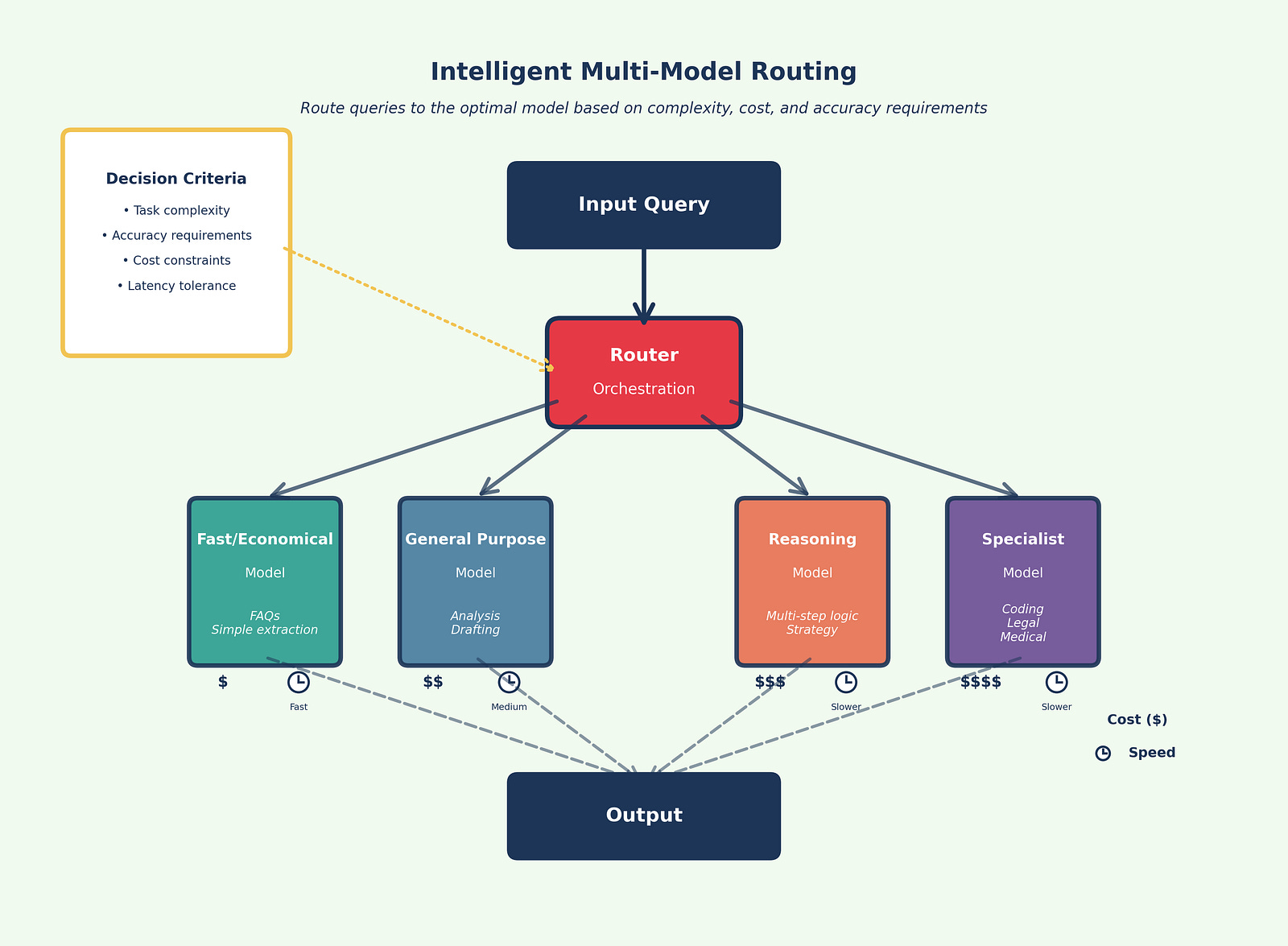
Use more than one model. Route simple tasks to inexpensive, fast models and reserve premium reasoning for hard cases (Figure 2).. Cross-check critical outputs across two models when accuracy matters. Over a third of enterprises now report using five or more models in parallel (15)(2).
The strategic rationale for multi-model architecture encompasses several dimensions:
Task specialization: Different models excel at different tasks. Claude leads on coding, Gemini handles extremely long documents best, ChatGPT offers strongest general-purpose versatility. Match the tool to the task rather than forcing everything through a single platform.
Risk mitigation: Avoid dependence on a single vendor, protecting against outages, price changes, or strategic shifts. When one provider experiences issues, route traffic to alternatives without manual intervention.
Cost optimization: Route work to the most cost-effective model capable of handling each task. Simple queries don’t need premium reasoning capabilities. Reserve expensive compute for problems that require it.
Accuracy enhancement: Cross-reference outputs from multiple models to reduce hallucination risks and improve reliability. When models agree, confidence increases. When they disagree, flag for human review.
Competitive pressure: Multi-model architectures create vendor competition that benefits buyers. Providers compete on capability, reliability, and cost rather than relying on lock-in.
Multi-Model Strategy and Integration
Integration with Existing Infrastructure
Success in AI implementation often depends on how well new capabilities integrate with existing technology investments. The traditional enterprise data stack consists of data warehouses, ETL tools, BI platforms, and SQL, representing massive investments that AI should enhance rather than replace.
SQL and LLM integration exemplifies this enhancement approach. LLMs translate natural language questions into SQL queries, explain complex SQL in business terms, and interpret results to highlight key insights. This creates “chat with your data” interfaces that democratize data access without replacing robust SQL infrastructure.
Business Intelligence enhancement adds conversational capabilities to existing dashboards. AI generates dynamic narratives explaining trends, identifies anomalies with natural language explanations, and enables users to ask follow-up questions naturally. This augmentation makes BI tools more accessible and insightful without requiring replacement.
APIs serve as essential connectors, enabling access to various AI services, embedding AI features in existing software, automating workflows across systems, and maintaining controlled, secure access. Think of APIs as standardized interfaces that allow different systems to communicate predictably and securely.
Advanced Implementation Patterns
Orchestration Strategies
Sophisticated AI implementations employ several patterns that combine multiple models and techniques to achieve complex business objectives. Understanding these orchestration patterns is essential for building systems that deliver reliable, scalable value.
Sequential Processing
Sequential processing treats LLMs like an assembly line where output from one model becomes input for the next. This pattern leverages specialization, allowing each model to focus on what it does best while creating cohesive end-to-end workflows.
Example: Customer Feedback Analysis Pipeline (Figure 3)
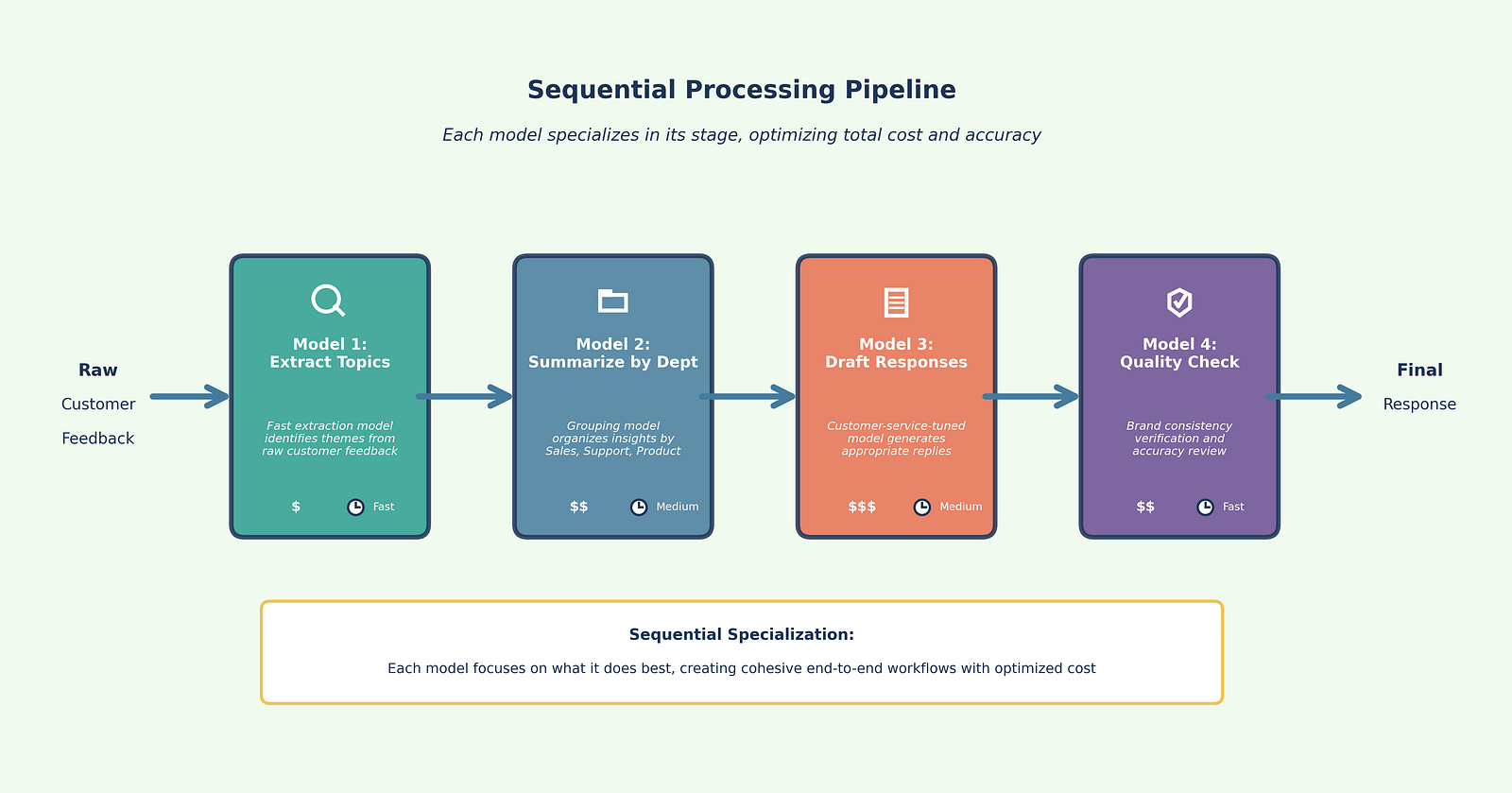
Extract topics (Model 1): Fast, economical model identifies key themes from raw feedback
Summarize by department (Model 2): Specialized model groups insights by business function
Draft responses (Model 3): Customer-service-tuned model generates appropriate replies
Quality check (Model 4): Review model ensures brand consistency and accuracy
This specialization reduces errors, improves consistency, and allows cost optimization by matching model capabilities to task requirements at each stage.
When to use: Multi-step workflows where each stage has distinct requirements, transformations that benefit from specialization, pipelines where intermediate outputs need different model strengths.
Parallel Processing
Parallel processing sends the same input to multiple LLMs simultaneously, comparing outputs to increase confidence. Agreement among models suggests reliability, while disagreement flags the need for human review.
Example: Risk Assessment System (Figure 4)
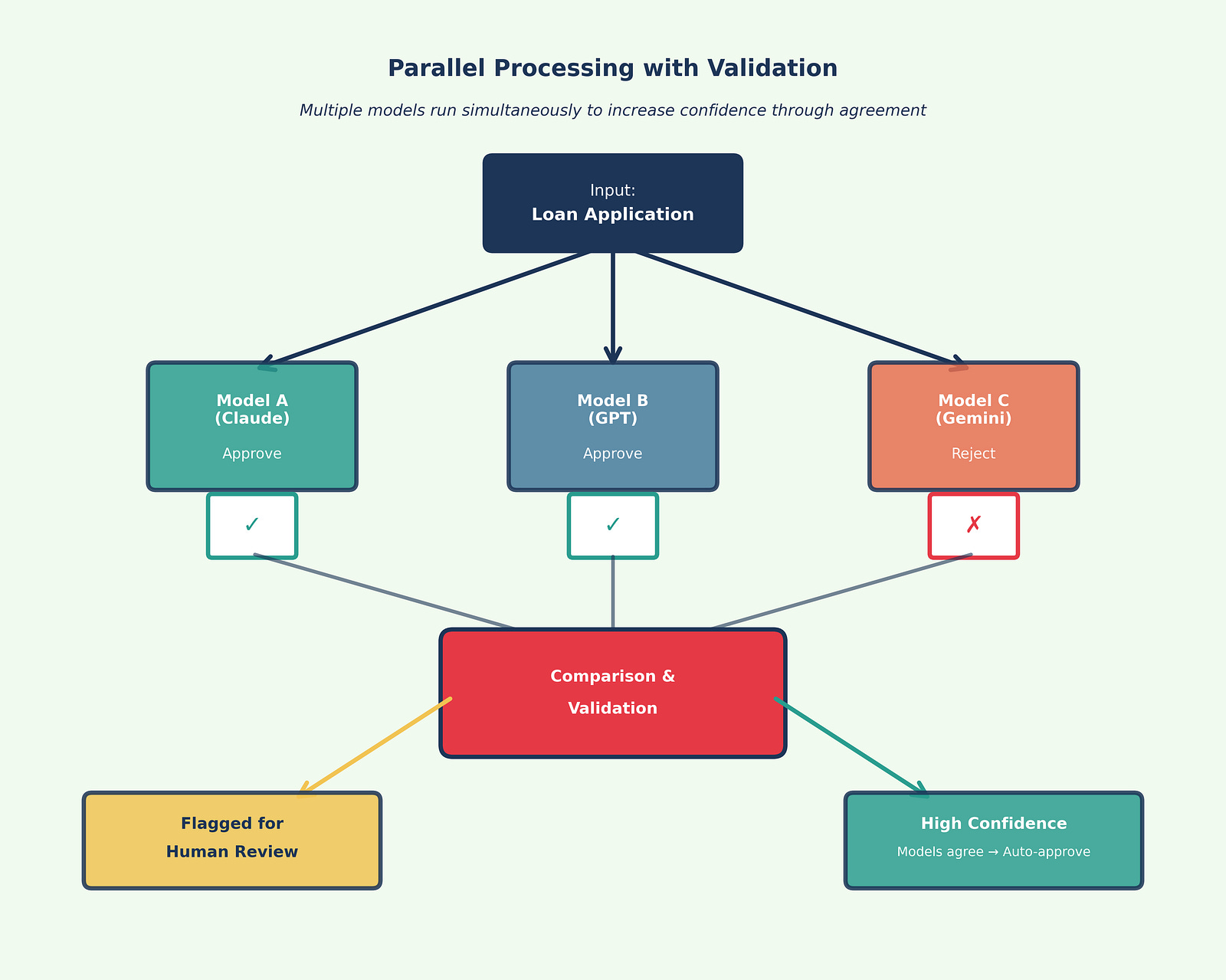
Send loan application to three models simultaneously
If all three approve with similar reasoning → Auto-approve
If all three reject with similar reasoning → Auto-reject
If models disagree → Flag for human underwriter review
This pattern proves valuable in risk assessment, compliance checking, strategic analysis, and any context where accuracy is paramount and the cost of error is high.
When to use: High-stakes decisions requiring validation, regulatory or compliance scenarios, strategic analysis where multiple perspectives add value, situations where false positives or false negatives carry significant cost.
Hierarchical Processing
Hierarchical processing routes tasks based on complexity or type, creating a tiered system that optimizes both cost and performance. Think of it as triage: simple cases get handled by fast, economical models, while complex cases escalate to more powerful (and expensive) capabilities.
Example: Customer Service System (Figure 5)
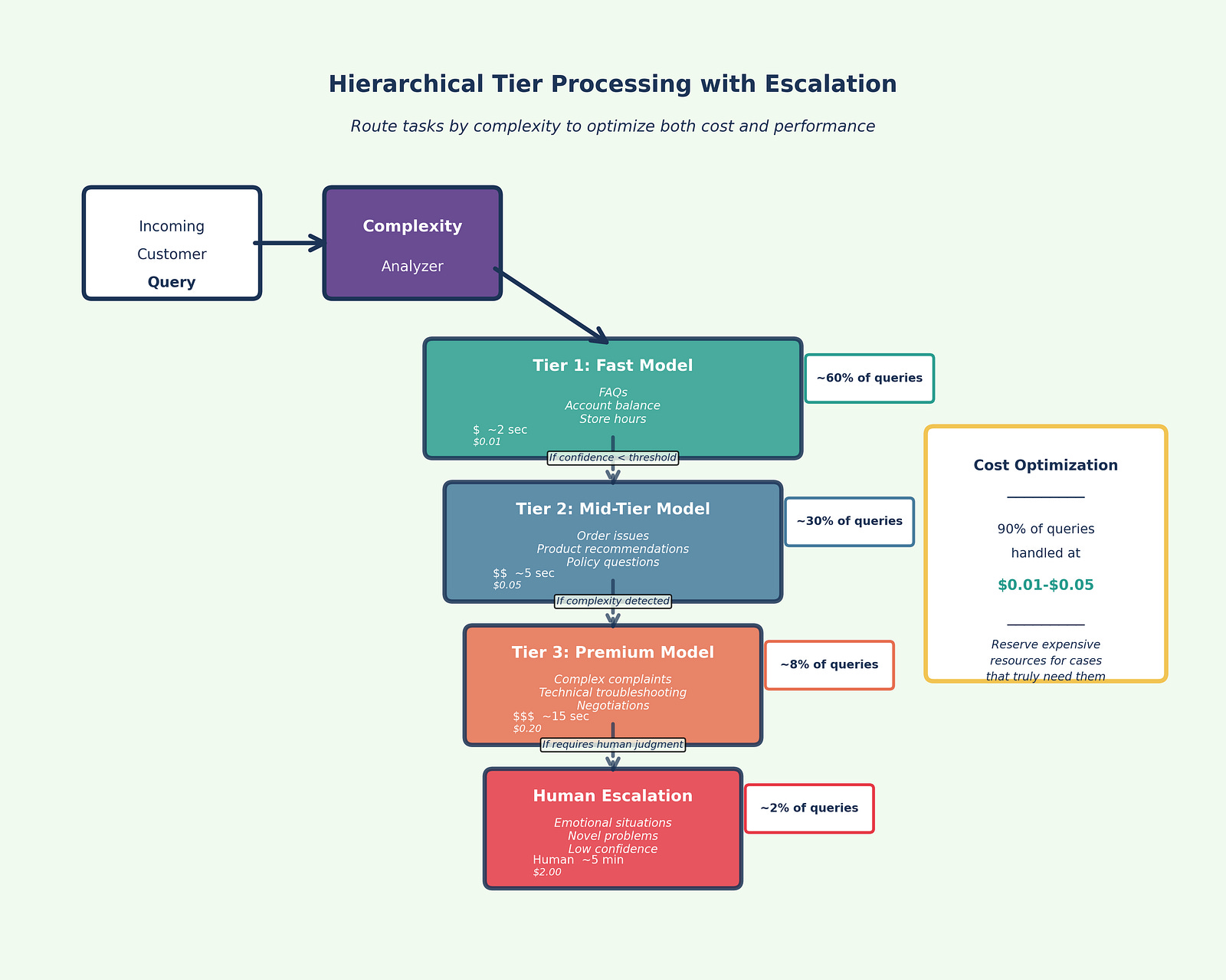
Tier 1 (Fast, economical model): Handles routine FAQs, account inquiries, simple requests
Tier 2 (Mid-tier model): Manages moderately complex issues requiring context and judgment
Tier 3 (Premium model): Addresses complex, sensitive, or escalated cases
Human escalation: Emotional situations, novel problems, or cases where AI expresses low confidence
The system automatically routes each interaction to the appropriate tier based on complexity indicators: query length, sentiment analysis, topic classification, and confidence scores.
When to use: High-volume operations with variable complexity, cost-sensitive deployments, customer-facing systems requiring different response speeds, scenarios where most cases are simple but some require deep reasoning.
Feedback Loops and Self-Correction
Feedback loops use LLMs to review and refine outputs from other models, creating an iterative refinement process that produces higher quality results while maintaining efficiency.
Example: Content Generation System
Draft (Model 1): Fast model generates initial content based on brief
Review (Model 2): Editor model checks against brand guidelines, tone, accuracy
Feedback (Model 2 → Model 1): Provides specific improvement suggestions
Revise (Model 1): Incorporates feedback and generates improved version
Final Check (Model 2): Validates that revisions addressed concerns
Human Approval: Final review by human editor for publication
This pattern works particularly well for content creation, code generation, document drafting, and any scenario where quality matters more than speed.
When to use: Quality-critical outputs, brand-sensitive content, complex documents requiring consistency, scenarios where revision is cheaper than getting it perfect on the first try.
Practical Orchestration Considerations
Cost management: Orchestration increases API calls, so instrument cost per completed workflow, not just per individual call. A sequential pipeline with four models might cost more per workflow than a single premium model.
Latency trade-offs: Parallel processing adds latency for the slowest model. Sequential processing accumulates latency across stages. Design with user expectations in mind.
Error propagation: In sequential pipelines, errors compound. Build validation checkpoints between stages and design for graceful degradation.
Monitoring complexity: Multi-model systems require sophisticated observability. Track success rates, confidence scores, escalation patterns, and cost per stage. Set alerts for unusual patterns.
Prompt Engineering Excellence
Effective prompt engineering dramatically improves AI performance while reducing costs. Key techniques include:
Chain of thought prompting guides LLMs to reason step-by-step before providing final answers. This improves complex problem-solving and makes reasoning transparent. Example: “Before answering, think through: (1) What information is needed? (2) What assumptions apply? (3) What edge cases exist? Then provide your final answer.”
Few-shot learning includes examples of desired input-output formats directly in prompts. This teaches LLMs specific tasks without requiring fine-tuning or extensive instructions. Example: Show 2–3 examples of the exact format you want, then ask for the same format on new input.
Role-based prompting assigns LLMs specific expert personas, tailoring their knowledge, tone, and style to match requirements. Example: “You are a senior financial analyst with 15 years of experience in SaaS metrics. Explain this P&L statement…”
Meta-prompting uses LLMs to generate or refine prompts for other LLMs or tasks, scaling prompt engineering expertise across organizations. Example: Ask Claude to design the optimal prompt structure for a specific use case, then use that prompt with your production model.
Governance and Responsible AI
Evolving Governance for AI
AI governance extends traditional data governance to address unique challenges posed by model-based decision systems. While traditional governance focuses on data quality, access control, and compliance, AI governance must additionally address model selection and deployment, output validation, bias monitoring, ethical considerations, and fairness requirements.
A comprehensive governance framework addresses five key areas:
Acceptable use and risk appetite defines which tasks are appropriate for AI and acceptable risk levels for different applications. Considerations include error impact, data sensitivity, regulatory requirements, and reputation risks.
Data handling and security policies must evolve beyond traditional protections to address AI-specific concerns: what data can be sent to external services, how to maintain data residency requirements, when to anonymize data, and how to audit AI system usage.
Output quality and human oversight establishes systematic validation approaches, determining where human review is mandatory, how errors are corrected, and who maintains accountability for AI-assisted decisions.
Transparency and explainability requirements vary by application. While full explainability may be impossible, organizations should strive for transparency about AI usage, limitations, and decision processes.
Training and ethics programs ensure responsible AI use across organizations. Employees need to understand capabilities and limitations, develop critical thinking for evaluating outputs, and internalize ethical guidelines.
Regulatory Compliance: Current Requirements
Recent regulatory developments across multiple jurisdictions create practical constraints for enterprise AI deployment:
European Union
The EU’s framework for general-purpose AI is now operational. Models meeting the 10²⁵ FLOPs computational threshold trigger systemic-risk obligations including mandatory incident reporting with tight deadlines: 2, 10, or 15 days depending on incident severity (6)(7).
Key Requirements:
Systemic risk assessment for high-capability models
Mandatory incident reporting within specified windows
Public-facing summaries of training data and model capabilities
Annual independent audits for high-risk systems
Conformity assessments before deployment
Organizations operating in the EU must operationalize these requirements in vendor selection, data handling procedures, and incident monitoring systems.
United Kingdom
The UK launched the AI Growth Lab on October 21, a regulatory sandbox offering supervised testing for ambitious AI implementations (8). This pro-innovation approach allows companies to test use cases under regulator visibility while receiving guidance on compliance requirements.
Key Features:
· Supervised testing periods with tailored oversight
· Fast-track approvals for healthcare and climate applications
· Post-sandbox compliance assessment required
· Sector-specific guidance from existing regulators
Organizations pursuing frontier AI applications in the UK should evaluate sandbox participation for risk mitigation.
China
China’s requirements took effect September 1, mandating labeling for all AI-generated content (9). Synthetic media must carry visible watermarks or metadata tags identifying its origin.
Additional Requirements:
Government approval for models with specific capabilities
Mandatory security assessments before public deployment
Real-name registration for AI service users
Content filtering aligned with regulatory expectations
Organizations serving Chinese markets must implement labeling infrastructure and navigate approval processes for model deployment.
United States
The US federal landscape shifted toward deregulation to accelerate AI development while maintaining voluntary safety commitments. However, state-level activity intensified, with over 150 state laws now governing AI deployment across sectors including employment, insurance, healthcare, and criminal justice.
Key Tension: Federal deregulation versus state-level prescriptive requirements creates compliance complexity for multi-state operations. Organizations must track requirements in each jurisdiction where they operate.
Implementation Best Practices
Successful AI implementation follows several key principles:
Start simple and focused with read-only integrations that provide insights rather than taking direct actions. Use existing infrastructure where possible and pilot with non-critical processes to build confidence and capability.
Prioritize data quality recognizing that AI amplifies both good and bad data. Implement quality checks before sending data to LLMs and monitor for data drift that could degrade performance over time.
Design for scale and resilience using caching to reduce API calls and costs, implementing robust error handling, and monitoring costs closely while scaling gradually based on proven success.
Maintain strong governance by applying AI principles consistently across applications, ensuring regulatory compliance, implementing appropriate access controls, and maintaining regular monitoring and auditing.
Building Long-Term AI Capabilities
Creating Sustainable AI Advantage
Organizations that successfully leverage AI for competitive advantage share several characteristics. They view AI as a capability to be developed rather than a technology to be purchased. They invest in both technical infrastructure and human skills. They create feedback loops that enable continuous improvement. Most importantly, they maintain focus on business value rather than technical sophistication.
Building these capabilities requires a phased approach. Initial efforts should focus on demonstrating value through quick wins while learning what works in the specific organizational context. As capabilities mature, organizations can tackle more complex applications and deeper integrations. Eventually, AI becomes embedded in standard business processes rather than treated as special initiatives.
The Human Element
Throughout this transformation, the human element remains paramount. AI excels at processing vast amounts of information, identifying patterns, and generating initial outputs. Humans provide context, judgment, creativity, and ethical oversight. The most successful implementations recognize this complementary relationship and design systems that leverage the strengths of both.
This human-AI partnership extends beyond individual tasks to organizational learning. As teams work with AI systems, they develop new skills, discover new possibilities, and refine their approaches. This organizational learning becomes a sustainable competitive advantage that transcends any specific technology or model.
Key Implementation Principles
Analysis of successful versus failed implementations reveals consistent patterns:
Solve business problems, not technology challenges. Start with painful, quantifiable constraints rather than technology-first thinking. Organizations identifying specific business problems first see higher success rates.
Fix data before deploying models. Allocate 50–70 percent of timeline and budget to data readiness. Data quality is cited as the top obstacle by most organizations, yet most underinvest in preparation.
Design for collaboration, not replacement. Augmented intelligence consistently beats pure automation in nuanced judgment tasks. Small amounts of human feedback dramatically improve model performance.
Treat AI as a living product. Assign dedicated product managers with explicit SLOs. Conduct quarterly research spikes to incorporate model improvements. Implement standardized observability and monitoring.
Empower line managers with central governance. Decentralized implementation authority with central oversight works better than isolated AI labs working without business context.
Partner or purchase over internal build. For most organizations, partnering with vendors or purchasing solutions achieves higher success rates than internal development, particularly for non-differentiating capabilities.
What Not to Overclaim
Benchmarks are signals, not destiny. Technical performance metrics are valuable for screening and comparison. They do not guarantee lower defect rates in your codebase or fewer escalations in your contact center. Test rigorously in your specific context before scaling.
Vendor claims require verification. Treat vendor-reported capabilities, particularly around “autonomy” or “hours-long” operation, as engineering opportunities to test rather than outcomes you can bank without instrumentation. Build your own evidence.
Be disciplined with evidence. Reserve precise percentage lifts for figures you can tie to public filings or high-quality studies. When using company-reported outcomes, label them as such. Where studies disagree, acknowledge the disagreement and present both perspectives.
Process redesign drives value, not time savings alone. AI saves time, but that time only creates value when you redesign processes to absorb it. Organizations that focus solely on automation without process transformation miss most of the opportunity.
Conclusion
AI implementation works best when treated as a product discipline. Pick a painful workflow, instrument it well, and ship based on evidence. Assume a multi-model world and route by task. Align governance with risk. Redesign processes so time saved turns into value.
The organizations that do this consistently will see compounding returns, independent of who is ahead on a given benchmark this month. The technology will continue to evolve rapidly. The strategic frameworks and implementation principles presented here remain applicable because they focus on business fundamentals rather than technical ephemera.
The journey ahead requires courage to experiment, wisdom to choose appropriate applications, and persistence to build new capabilities. But for organizations willing to embrace this transformation thoughtfully and strategically, learning from both successes and failures while maintaining realistic expectations, the rewards in efficiency, innovation, and competitive advantage are substantial.
Ultimately, AI implementation success comes from augmenting human capabilities rather than replacing them, whether the deployment is managed internally, outsourced, or executed through hybrid approaches. The future belongs to organizations that successfully navigate beyond the hype, ground themselves in practical implementation, and build sustainable capabilities that enhance human intelligence with AI tools.
References
(1) TechCrunch, “Anthropic overtakes OpenAI in enterprise market share, says Menlo Ventures,” 2025.
(2) Andreessen Horowitz, “The Real State of AI: 2025 Enterprise CIO Survey,” 2025.
(3) Anthropic, “Claude 4.5 Sonnet,” model and release materials, September 2025.
(4) OpenAI, “GPT-5: system card and launch materials,” August 2025.
(5) Wired, “OpenAI Launches ChatGPT With GPT-5,” August 2025.
(6) European Commission, “General-purpose AI (GPAI) obligations and systemic-risk presumption,” 2025.
(7) European Commission, “Serious-incident reporting timelines under the AI Act,” 2025.
(8) UK Government, “AI Growth Lab: regulatory sandbox announcement,” October 21, 2025.
(9) Covington & Burling, InsidePrivacy, “China’s AI-Generated Content Labeling Measures Effective September 1, 2025,” 2025.
(10) The Decoder; Meta, “Llama 4 license terms and enterprise performance assessments,” 2025.
(11) Fortune, “Company that laid off most of its workforce and replaced them with AI sees huge revenue spike,” 2025.
(12) CX Dive and Fortune, “Klarna adds human option and rebalances AI customer service,” May 2025.
(13) HRKatha; Information Age, “IBM HR automation scale and rebalancing,” May 2025.
(14) VentureBeat, “DeepSeek V3.1 architecture, licensing, and cost dynamics,” 2025.
(15) Andreessen Horowitz, “Enterprise multi-model adoption (five or more models),” 2025.
(16) IndustryWeek, “AI and ROI: Translating time saved to business gains” (summarizing Gartner), 2025.
(17) Comet, “Gemini 2.5 series: specs and benchmark highlights,” 2025.
(18) TechCrunch, “ASML invests €1.3B in Mistral,” September 2025.
About the Author
Hassan LÂASRI is a consultant, interim executive, and lecturer specializing in data, AI, technology transformation, and scale. With over 20 years of experience leveraging data and AI across multiple industries, he assists startups, growing ventures, and established firms in developing and implementing strategic initiatives from conception through execution.
His expertise spans marketing, sales, CRM, and supply chain management across diverse sectors including retail and luxury, technology and telecommunications, financial services, and media. Based in Paris, France, Hassan advises clients globally, bringing both academic rigor and practical business experience to his work.
Hassan’s educational and research background includes a PhD, post-doctoral research, and two patents in AI, providing the theoretical foundation that complements his extensive practical experience. His approach to AI implementation emphasizes immediate value creation while building long-term strategic capabilities, making complex technologies accessible and actionable for business leaders.
Through his executive education programs, consulting engagements, and written work, Hassan helps organizations bridge the gap between AI potential and practical implementation. His pedagogical philosophy centers on the belief that executives need to become informed buyers and strategic deployers of AI, not data scientists, and his teaching reflects this practical, business-focused approach.
Publication note: Co-published on Medium the same day; no changes.
Tip for those who work with Gemini but need the Projects feature that exists in Claude and ChatGPT:
Practical tips in comments: Gemini does not currently have a Projects feature like Claude or ChatGPT, which means you cannot create a single space to store all related documents and chat threads. A practical workaround is a three-tool workflow that fills this gap:
- Google Drive serves as the Vault for all project files and documentation.
- NotebookLM acts as the Brain, synthesizing information from your files and grounding responses in facts.
- Gemini becomes the Doer, executing tasks strictly based on the synthesized context.
The cycle is manual but ensures that your tasks and outputs remain consistent, structured, and fact-based. You initiate research in Gemini, store and update it in Drive, synthesize it in NotebookLM, and then execute back in Gemini.
This structure replicates the “project context” you would have in Claude or ChatGPT, providing a reliable way to manage complex workflows within Gemini.
Tip for those who need professional slides at the end of their workflow:
Tips: One practical gap I’ve noticed in AI-generated slide tools is consistency and quality. Many produce layouts that feel generic or rushed, which makes the slides less useful in real work contexts. A workflow I’ve tested reliably fills that gap:
- Draft your slide content in Markdown with your preferred AI (ChatGPT, Claude, or Gemini).
- Import it into iA Presenter (https://ia.net/presenter).
iA Presenter focuses on formatting and layout while you concentrate on the message itself. Think of it as LaTeX for slides, but more visually polished. The result is slides that feel thoughtful, professional, and intentionally crafted rather than machine-generated.
This approach addresses the middle-ground problem where most AI slide generators either over-automate or under-deliver.